Choose an asset
Select a stock, ETF or index from the symbols available in the app. Sheep Trade also supports alerts for Bitcoin, Ethereum and major cryptocurrencies. Symbol and quote availability can vary.

Sheep Trade lets you monitor stocks and ETFs with predefined alerts, configurable conditions and custom formulas. Choose what to watch, set the rule that matters to you, and choose how often your device checks it.

Choose a symbol, define a condition and select a check interval in the app preferences, such as every 5, 10 or 15 minutes. Android exact alarms schedule these checks on your device during the configured market hours and trading days.
Select a stock, ETF or index from the symbols available in the app. Sheep Trade also supports alerts for Bitcoin, Ethereum and major cryptocurrencies. Symbol and quote availability can vary.
Start with a predefined alert, configure a complete alert using its available parameters, or build a formula from supported values and indicators.
When a checked condition is met, Sheep Trade sends a notification from the app on your device. This is not a remote push notification. Timing depends on the selected interval, connectivity, quote availability and Android settings.
Choose one of nine predefined alerts, configure a complete alert with a form, or build your own formula alert.
Set six parameters: alert color, how long the alert remains valid, variable, operation, multiplier and value. Use them to define conditions such as a price approaching a yearly high or crossing a moving average.
Build and name a formula using quote values and indicators calculated by the app. Formula conditions can include more than one symbol, allowing you to combine information from multiple instruments.
Use alerts to monitor the conditions you choose. These examples are monitoring rules, not investment recommendations.
Set an alert for when a stock rises to or falls to a price you choose.
Use the predefined condition for volume reaching twice its average over the previous three months, or build a formula with volume and average volume.
Use the predefined RSI (14) thresholds below 30 or above 70, or create a formula comparing the price with an SMA or a Bollinger Band.
For example, create a condition for the current price crossing SMA 50, or for SMA 20 moving above SMA 50.
Create a formula that considers more than one instrument, such as combining the price movement of a stock with the Nasdaq’s movement.
These app screens show the available alert types, predefined rules and formula tools.
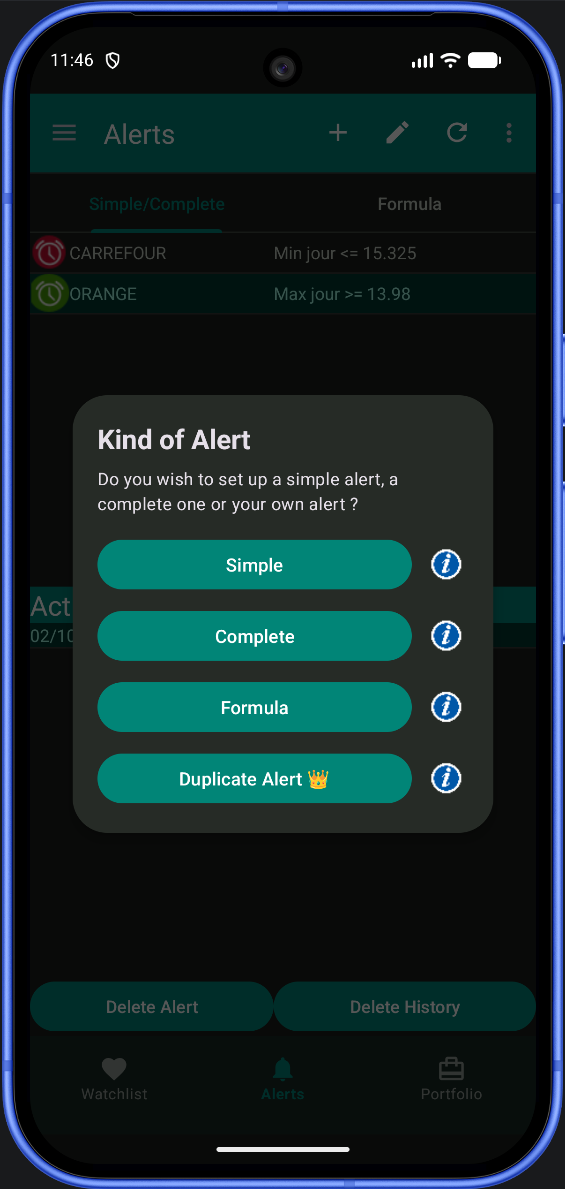
Start with a simple alert, configure a complete alert, or create a formula.
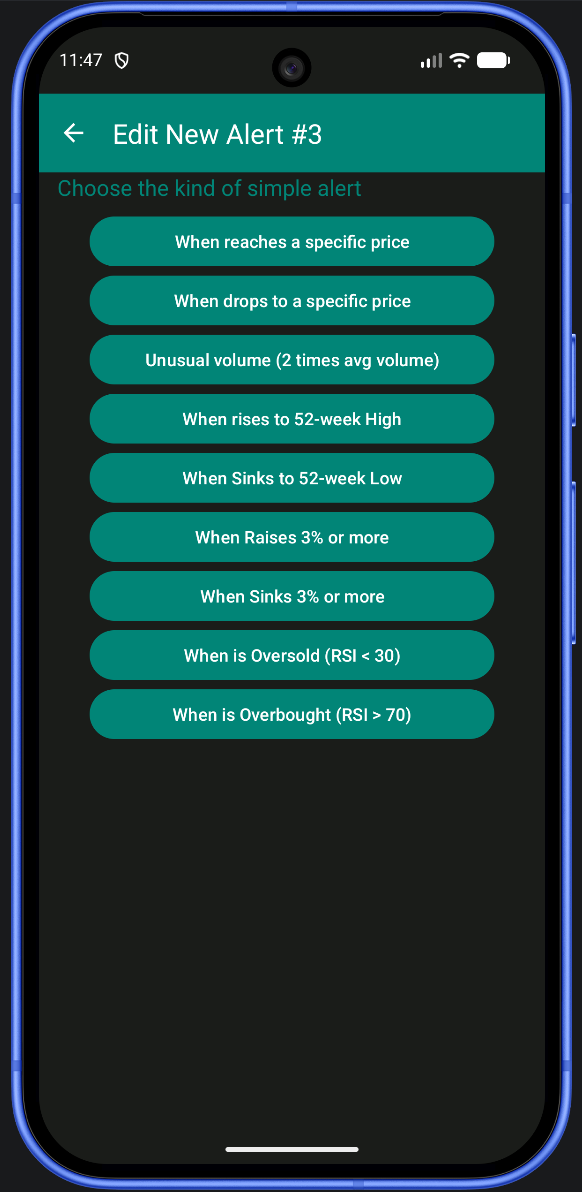
Choose from price, unusual volume, 52-week extremes, daily moves or RSI thresholds.
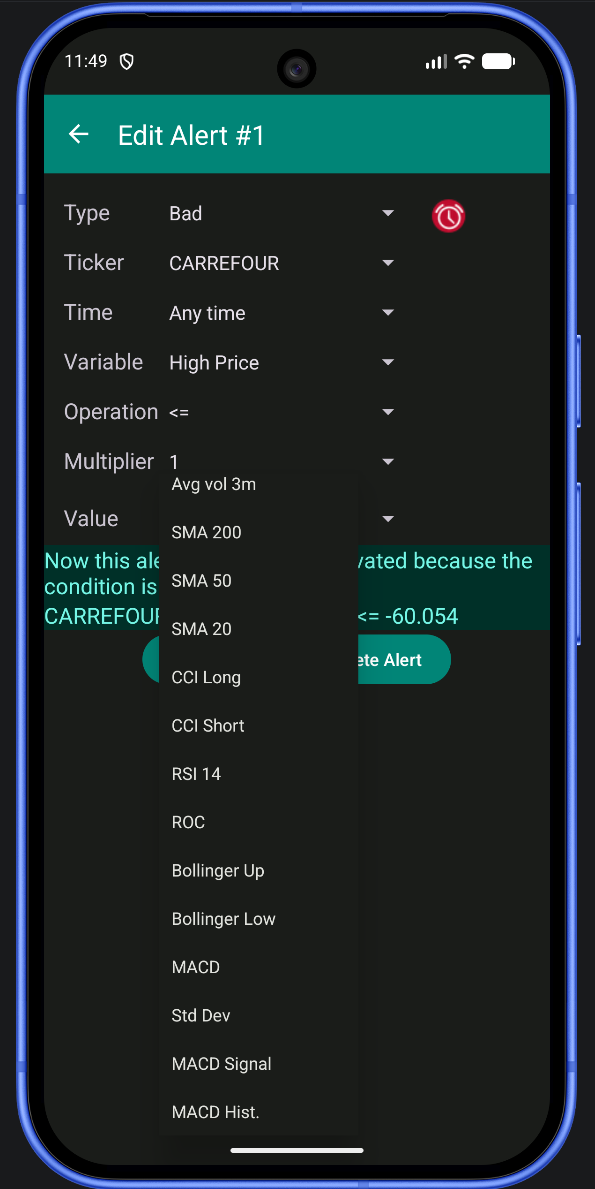
Set the symbol, validity time, variable, operation, multiplier and comparison value.
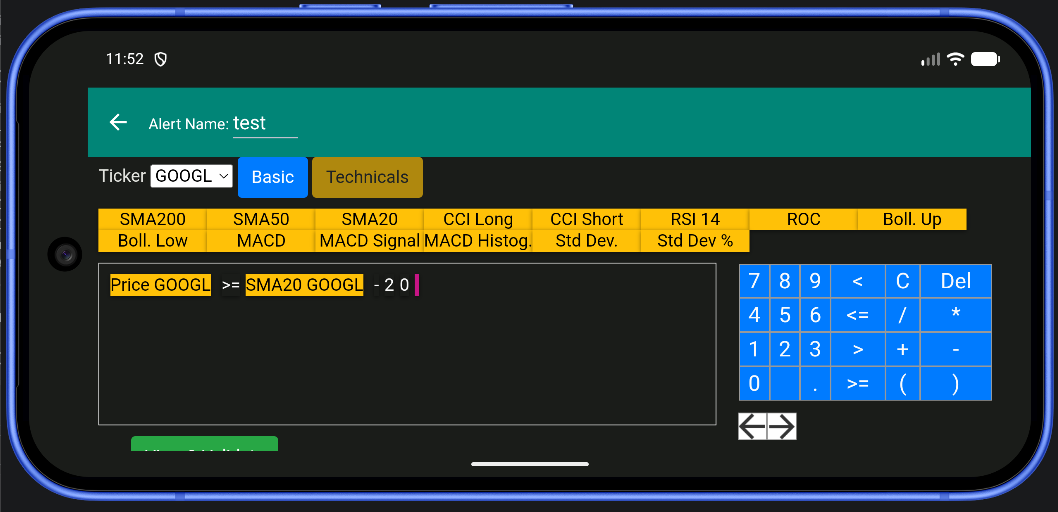
Combine quote values, indicators and operators in the visual formula editor.
The formula editor exposes these technical values and quote fields. You can combine them with supported operations to create your own conditions.
The predefined alert list includes RSI (14) crossing below 30 or above 70. These are configurable monitoring thresholds, not buy or sell signals.
Use SMA 20, 50 or 200, CCI (long or short), RSI (14) and ROC in formula conditions.
The formula editor includes upper and lower Bollinger Bands, MACD, its signal and histogram, plus standard deviation and standard deviation as a percentage.
Formula values include the day’s high and low, current price, volume, percentage and absolute change, opening gap (calculated from the open and previous close), 52-week high and low, and three-month average volume.
It is important to understand how checks happen before relying on an alert.
You choose how often the app checks alerts, with intervals such as 5, 10 or 15 minutes. Android exact alarms schedule the check on your device during the configured market hours and trading days. If the app is not open, the app can still show a notification when an alert is triggered. These are device notifications, not server-based push notifications.
The check is scheduled at your selected interval during the configured monitoring window, so an alert is not a continuous, tick-by-tick monitor. For example, with a 30-minute interval, the next check may not happen until nearly 30 minutes after a condition becomes true. Internet access, quote availability, Android exact-alarm permission and background restrictions can add further delay.
Sheep Trade receives real-time data for the US market. Quotes for all other markets are delayed. An alert based on a delayed quote can therefore be triggered later than the market movement it is tracking.
Yes. Configure a complete alert with the form or build, validate and name a custom formula alert.
Yes. Sheep Trade supports alerts for ETFs as well as stocks.
Alerts are scheduled with Android exact alarms at the interval you select, but checks are not continuous. Quote delays, connectivity, permissions and Android background restrictions can affect when a notification appears.
Yes. A formula can use values from more than one symbol, for example combining a stock’s movement with the Nasdaq’s movement.
Android battery restrictions and permissions for notifications and exact alarms can affect scheduled checks. On newer Android versions, allow the app to run in the background and confirm its required permissions.
Sheep Trade is a stock market alerts app for stocks, ETFs and other instruments available across international financial markets. Configure alerts for symbols in the app’s market lists; symbol and quote availability can vary.
Choose the symbols you want to follow, configure the conditions that matter to you, and review the app’s data and notification settings for your device.
Get Sheep Trade on Google Play